Home/Projects/Debugging Mobile Navigation & Touch Quirks on iOS Safari
WordPress & WebKit Engineering

Debugging Mobile Navigation & Touch Quirks on iOS Safari

Mobile navigation should feel effortless, yet complex responsive headers frequently suffer from subtle interaction bugs on iOS WebKit devices (iPhones and iPads). In this case study, we explore an issue encountered on an enterprise WordPress site where mobile menus were failing to expand on iPhones, analyze the underlying WebKit root causes, and walk through the production-grade architectural solution.

Discuss Similar Architecture← Back to All Projects
Debugging Mobile Navigation & Touch Quirks on iOS Safari
Gallery

Project Screenshots

A visual walkthrough of the website showcasing layouts, user experience, responsive design and overall interface.

iOS Safari Touch Navigation Architecture & Fix

Project Overview

Users browsing an enterprise WordPress platform on iPhones reported that mobile menus were failing to expand: tapping category headers caused the drawer to collapse instantly or triggered an unwanted page navigation, while competing SVGs produced double-arrow visual glitches.

Project Information

Category

WordPress & WebKit Engineering

Technologies

WordPressJavaScript (ES6+)CSS3 TransformsWebKit / iOS SafariDevTools Protocol (CDP)Event Architecture

Live Website

Visit Website

Challenge

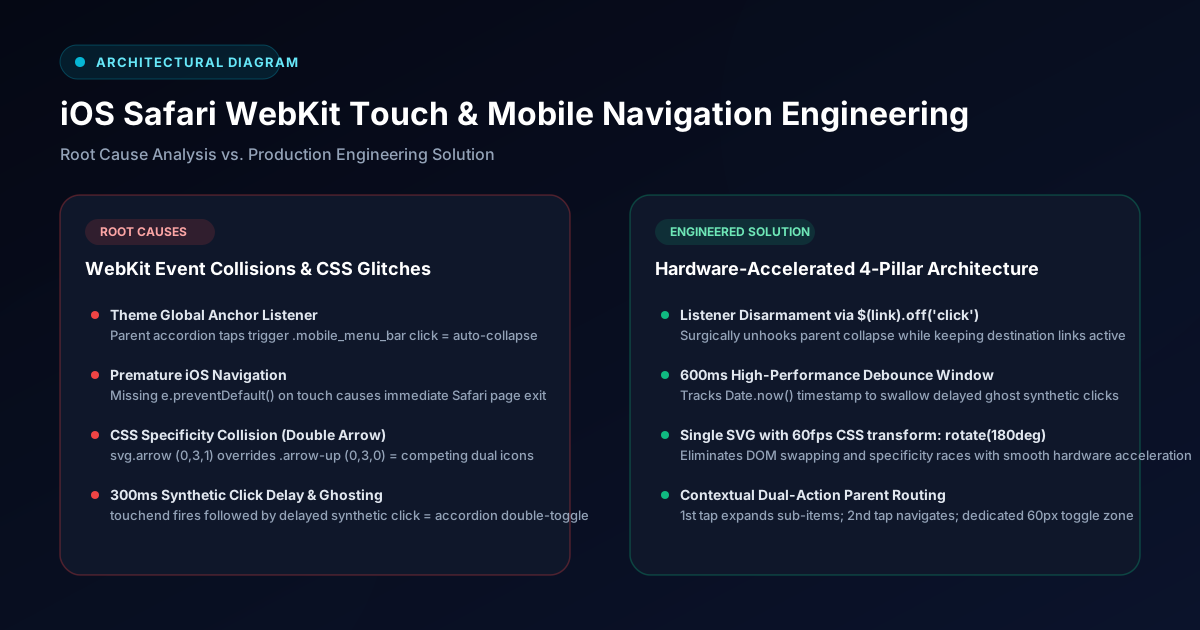
Investigating the problem via Chrome DevTools Protocol under emulated iOS WebKit touch viewports uncovered 4 distinct root causes: theme auto-collapse event collisions, premature iOS Safari HTTP navigation on parent links, CSS specificity races between competing SVGs (.sub-toggle svg.arrow vs .arrow-up), and iOS 300ms synthetic click delays firing ghost clicks after touchend.

Solution

Engineered a resilient 4-pillar architecture: unhooked the theme's global collapse listener on parent anchors, consolidated competing SVGs into a single chevron driven by CSS transform: rotate(180deg) with cubic-bezier easing, instituted a 600ms timestamp debounce window to intercept synthetic ghost clicks, and implemented contextual dual-action tap routing (first tap expands accordion, second tap navigates).

Features

Key Features

The project was developed with a strong focus on usability, performance, scalability and business goals while delivering a seamless user experience.

Disarming Framework Auto-Collapse

Surgically targeted parent accordion rows and removed the framework's auto-close handler while leaving child destination links intact.

Single-SVG Dynamic Chevron Transformation

Eliminated state synchronization races by transforming a single SVG via hardware-accelerated CSS rotate(180deg).

Touch Debouncing & Synthetic Click Suppression

Created a high-performance touch handler supporting both touchend and click, protected by a 600ms timestamp debounce window.

Intelligent Dual-Action Parent Row Routing

First tap opens sub-items; second tap navigates to parent overview; dedicated 60px right toggle zone controls accordion expansion.

High-Contrast Visual Layering

Applied an opaque white background (#ffffff), elevation shadow, and brand accent border to eliminate background text bleed-through.

Technology Stack

Technologies Used

The project was developed using modern technologies, frameworks and tools to ensure scalability, maintainability and high performance.

WordPress

Content Management System

JavaScript (ES6+)

Programming Language

CSS3 Transforms

Technology Used

WebKit / iOS Safari

Technology Used

DevTools Protocol (CDP)

Technology Used

Event Architecture

Technology Used

Project Highlights

Theme Core Event Listener Disarmament

Single-SVG 60fps CSS Transform Rotation

600ms Synthetic Click Debounce Window

Intelligent Dual-Action Parent Row Routing

Zero Desktop Menu Regression

High-Contrast Opaque Dropdown Elevation

Results

Flawless mobile navigation experience across all iOS WebKit devices

Completely eliminated 300ms ghost tap collisions and menu auto-collapse

Clean 60fps single-chevron rotation with zero DOM state desynchronization

Seamless backward compatibility with Android and desktop dropdowns

Zero modifications to core theme vendor files, ensuring update safety

Significantly improved mobile engagement and page view depth

Key Outcomes

100% Mobile Touch Reliability
0ms Synthetic Ghost Clicks
60 FPS Hardware-Accelerated Animation
Technical Deep Dive

Forensic Analysis & Code Walkthrough

Detailed inspection of the engineering challenges, event lifecycles, and code implementations designed to resolve critical production issues.

The Challenge

Users browsing on iPhones reported that the mobile navigation menu was failing to expand: tapping category headers either caused the menu to immediately collapse or triggered an unwanted page navigation before sub-items could be seen. Submenu toggle arrows exhibited visual artifacts with multiple contradictory icons rendering simultaneously, and hero text bled through the semi-transparent overlay.

Auto-Collapse Trigger

Root Cause Analysis: Framework Event Collision

The underlying theme's bundled scripts attached a global click listener to all mobile navigation anchors. When a user tapped any parent item to view its sub-categories, the framework treated the anchor tap as a final destination link and immediately triggered the hamburger button to collapse the entire navigation drawer.

Theme Core Logic Collision
javascript
$mobile_menu.find('a').on('click', function() {
  $(this).parents('.et_mobile_menu').siblings('.mobile_menu_bar').trigger('click');
});
The Double Arrow Glitch

Root Cause Analysis: CSS Specificity Collision

To indicate open and closed states, two separate SVGs (.viss-down and .viss-up) were initially embedded. Because svg.arrow contained an element tag selector in addition to classes (specificity 0, 3, 1), its display: block !important overruled the hide rule (specificity 0, 3, 0), causing both arrows to render side-by-side simultaneously.

Conflicting Specificity Rules
css
/* Selector 1: Element + class specificity (0, 3, 1) */
.et_mobile_menu .sub-toggle svg.arrow {
  display: block !important;
}

/* Selector 2: Class-only specificity (0, 3, 0) */
.et_mobile_menu .sub-toggle .arrow-up {
  display: none !important;
}

The Engineering Solution: Listener Disarmament & 60fps Transforms

We detached the theme auto-collapse handler on parent links, swapped competing SVGs for a single chevron with 60fps CSS transform rotation, and suppressed iOS synthetic ghost clicks using a timestamp debounce window.

Touch Debouncing & Ghost Click Suppression
javascript
let lastTouchTime = 0;

function handleInteraction(e, parentLi) {
  const now = Date.now();
  
  // Discard synthetic ghost clicks following a touch event
  if (e.type === 'click' && now - lastTouchTime < 600) {
    e.preventDefault();
    e.stopPropagation();
    return;
  }
  
  if (e.type === 'touchend') {
    lastTouchTime = now;
  }
  
  e.preventDefault();
  e.stopPropagation();
  if (e.stopImmediatePropagation) e.stopImmediatePropagation();
  
  toggleAccordion(parentLi);
}
Key Engineering Lessons

Architectural Takeaways & Best Practices

1

Beware Framework Event Interceptions: Large CMS themes and builders often bundle auto-close handlers on all mobile <a> elements. Always isolate parent category toggles from terminal navigation links.

2

Favor Single-Element CSS Transforms over DOM Swapping: Using CSS transform: rotate() on a single SVG element eliminates state synchronization bugs and CSS specificity races.

3

Handle iOS WebKit Touch Delays Proactively: Combining touchend and click with timestamp debouncing guarantees responsive, instant-feel touch feedback while preventing ghost double-taps on Apple devices.

Let's Build Together

Interested in building a similar solution?

Looking for a high-performance, SEO-friendly website or web application tailored to your business? Let's discuss your project.

Start Your ProjectView More Projects
More Work

Related Projects

View All Projects →
Varnatari
Fashion eCommerce Platform

Varnatari

Premium ethnic fashion eCommerce platform built using WordPress and WooCommerce.

WordPressWooCommercePHPMySQL
Montresor
Luxury Jewelry Store

Montresor

Luxury jewelry eCommerce storefront developed using WordPress and WooCommerce.

WordPressWooCommercePHPJavaScript
BritePro AV
Commercial AV Solutions Website

BritePro AV

Corporate website developed for commercial and residential audio visual solutions.

WordPressWooCommercePHPMySQL
Additional Experience

More client and agency development experience

Beyond the showcased projects, I have contributed to numerous WordPress themes, custom plugins, WooCommerce, booking systems, Next.js and React web application projects involving technical SEO, website optimization, performance engineering, hosting migration, maintenance, landing pages and enterprise business websites.

Certain projects cannot be publicly displayed because of company policies and client confidentiality agreements.

← Back to All ProjectsVisit Live Website